Album Factory Management Software
Macra's studio module goes past invoicing into the album factory floor itself — costing every job by its materials and machine, generating a job ticket per role, and giving front desk a live completion percentage instead of a guess. It's built for how Sri Lankan photo, printing and album studios actually produce work, not a generic job-tracker.
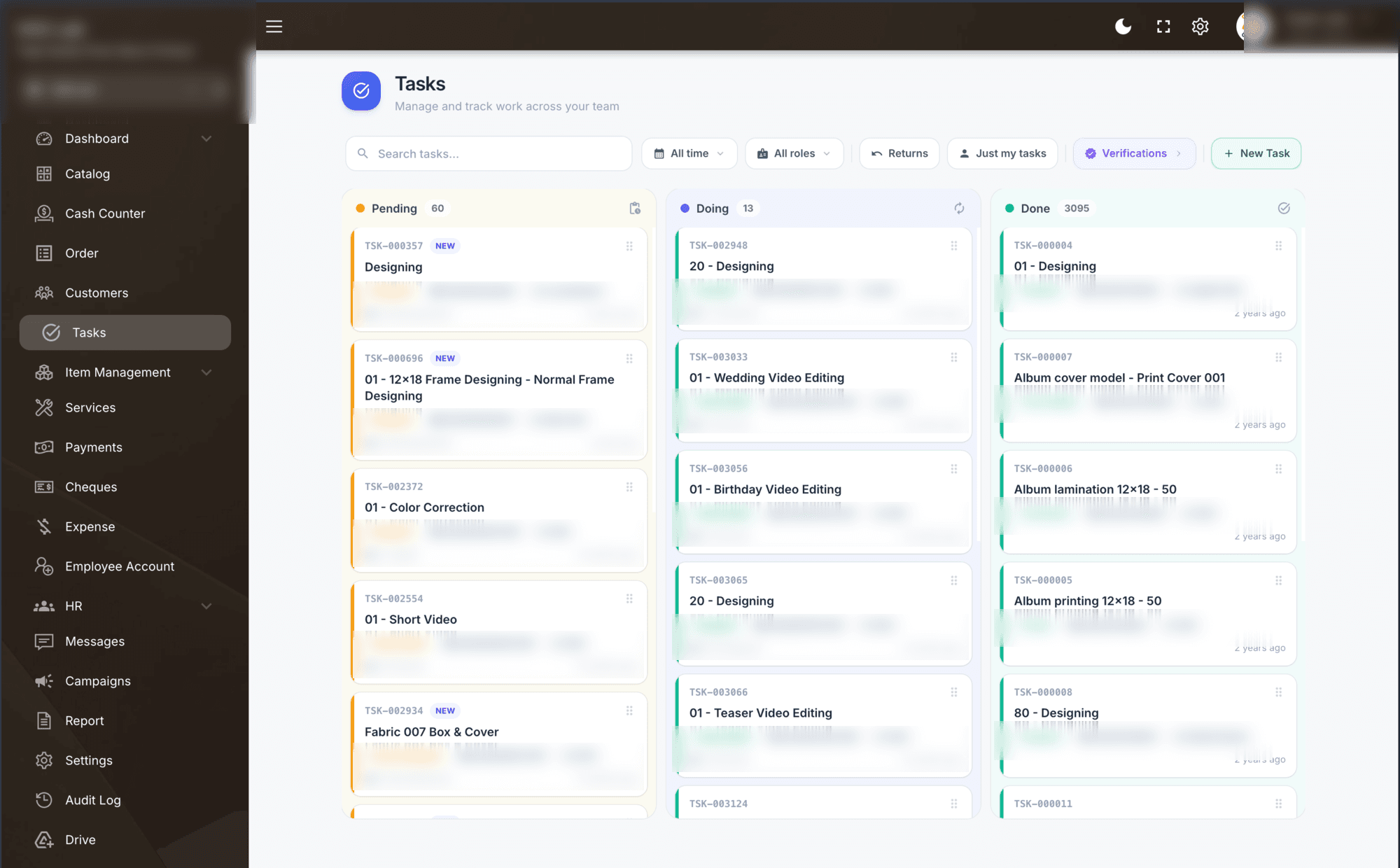
From materials to a finished, delivered job
Materials, covers & boxes costed per job
An album isn't one price — it's a cover, a box, a set of pages, lamination and whatever add-ons the customer picked. Macra lets you itemise album covers, boxes, fabrics, glass covers and lamination sheets as line items on every job, so the price reflects exactly what went into that order, and your material cost per job is never a guess.
Printing machine tracking
Record which machine ran a job — Konica Minolta, Green II, Green III, or any other digital press or laminator your factory runs. Over time you can see which machine is doing the most work, plan jobs around which press is free, and know your real machine-level throughput instead of treating printing as one black box.
Size-based pricing
Set a price per size — 12×18, 16×22, or any custom size your studio quotes in — once, and every future job at that size prices itself correctly. Combine size with material and finish, and the counter never has to manually recalculate a quote for a size they've priced a hundred times before.
Role-based job tickets
The moment an order is confirmed, Macra generates a job ticket for each step in production — one for the designer, one for the printer, one for lamination, one for the cover maker. Each person on the floor sees exactly what they're responsible for on that job, with no supervisor writing out a paper docket by hand.
Draggable task board for employees
Every job ticket lives on a Kanban-style board — Pending, Doing, Done — and employees drag their own ticket across as they pick it up and finish it. No paper job sheets, no whiteboard in the back room, and no employee unsure of what's next in their queue.
Front-desk completion & employee hour reports
Because every ticket's status is live, front desk sees a real percentage-complete for any order without walking to the back room to ask. Macra also times how long a ticket sits with an employee from pick-up to done — so at month-end you can generate a report per employee showing total hours burned across every job, useful for productivity review or spotting where a job type is taking longer than it should.
How one job moves through the factory
Order confirmed
A job comes in — sizes, materials, cover and box are itemised and priced automatically.
Job tickets generated
Macra creates a ticket per role: designer, printer, lamination, cover maker — each assigned to the right person.
Production on the task board
Staff drag their ticket from Pending to Doing to Done as they work, on whichever machine they're assigned.
Front desk sees live progress
Completion percentage updates automatically — no call to the back room needed to tell a customer where their order stands.
Month-end hour report
Every ticket's time is logged from pick-up to done. Generate a report per employee showing hours burned across the month.
Album factory & production questions, answered
What is an album factory management system?
An album factory management system tracks a photo album job from its materials and printing machine to the employee producing it and the hours it took — not just the sale. Macra's production module does this alongside your billing, so one job ticket carries its cost, its machine, its assigned staff and its live status.
Can it track which printing machine was used?
Yes. Record Konica Minolta, Green II, Green III or any other press or laminator against each job, so you can see machine-level throughput and plan jobs around which machine is free.
How does size-based pricing work?
You set a price once per size — 12×18, 16×22 or your own — and every job at that size prices itself automatically, combined with the materials and finish used.
Does it generate job tickets automatically?
Yes. The moment an order is confirmed, a job ticket is generated for each production role — designer, printer, lamination, cover maker — with nothing written out by hand.
Can front desk see job progress without calling the back room?
Yes. Every ticket's status feeds a live completion percentage, visible from the front desk the moment a customer asks about their order.
Can I see how many hours each employee spent on production?
Yes. Every job ticket is timed from pick-up to done, and at month-end you can generate a report per employee showing total hours burned across every ticket.
Is this part of the Studio Management System, or something separate?
It's built into Macra's Studio Management System — the same module that handles your billing, orders and customers. There's no separate product to buy or a second login.